
Overview
Wise Memory Optimizer is a utility tool designed to streamline memory management on computing devices, aiming to enhance system responsiveness and performance. The app functions as a straightforward solution for users seeking to free up system memory without manually closing applications or navigating complex system settings. Its primary purpose is to optimize available RAM by identifying and releasing unused memory segments, thereby improving multitasking capabilities and reducing lag during demanding tasks. This makes it particularly useful for users who run multiple applications simultaneously or work with memory-intensive software such as video editors, graphic design tools, or virtual machines. The target audience includes both casual users and professionals who value system stability and smooth operation but lack the technical expertise to manage memory resources manually. By providing a one-click optimization process, the app lowers the barrier to entry for performance tuning, making it accessible to a broad user base. While the developer did not provide additional information about their background or company history, the app’s focus on simplicity and ease of use aligns with a growing trend in productivity utilities that prioritize user experience over advanced diagnostics. Real-world use cases include boosting performance during gaming sessions, improving responsiveness when switching between browser tabs and office applications, and preventing slowdowns during long work sessions. In the broader app ecosystem, Wise Memory Optimizer fills a niche for lightweight, no-frills tools that deliver immediate benefits without requiring system-level permissions or deep configuration. It serves as a practical complement to built-in operating system features, offering a more accessible interface for memory optimization tasks.Key Features & Functionality
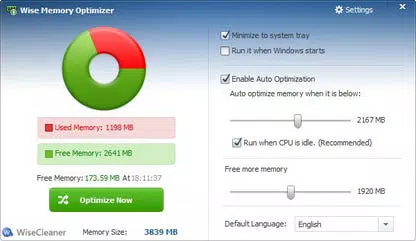
Wise Memory Optimizer offers a focused set of features designed to deliver tangible performance improvements with minimal user effort. The core functionality centers on one-click memory optimization, allowing users to instantly free up unused memory without terminating active applications. This feature is especially beneficial during high-demand workflows, where system responsiveness can degrade due to memory saturation. The app analyzes current memory usage and selectively releases idle or cached memory, resulting in faster application loading times and smoother multitasking. A key component of the app is its real-time memory usage monitoring system, which presents system memory data through an intuitive pie chart. This visual representation enables users to quickly assess how much memory is in use versus available, providing transparency into system resource allocation. Such visual feedback supports informed decision-making, particularly for users who want to anticipate performance bottlenecks before they occur. Customization options allow users to configure automatic optimization triggers based on memory thresholds. This proactive behavior helps maintain system stability during prolonged usage, reducing the risk of crashes or slowdowns. Additionally, the app can be set to launch automatically at startup, ensuring consistent performance optimization without requiring manual intervention. The app’s design emphasizes simplicity and convenience, eliminating the need for technical knowledge or system configuration. It operates in the background without disrupting ongoing tasks, making it ideal for users who prioritize seamless performance over advanced diagnostics. While it does not include detailed memory profiling or diagnostic tools, its streamlined approach delivers consistent results for everyday users seeking a hassle-free way to maintain optimal system performance.- One-click memory optimization for instant performance boost
- Real-time memory usage monitoring via visual pie chart
- Customizable automatic optimization based on memory thresholds
- Auto-start feature for continuous background optimization
- Non-intrusive operation that preserves active tasks
Interface, UX & Performance
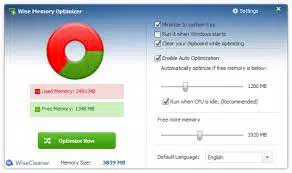
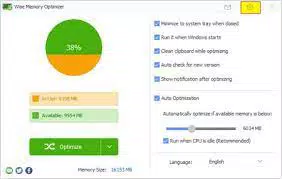
The interface of Wise Memory Optimizer is designed with clarity and minimalism in mind, prioritizing user accessibility over visual complexity. The main window features a clean layout centered around a large pie chart that displays real-time memory usage, clearly distinguishing between used and available memory. This visual cue allows users to quickly assess system health without needing to interpret numerical data or technical jargon. Navigation is straightforward, with a single primary button labeled “Optimize” that triggers the memory cleanup process. Secondary settings are accessible through a menu or preferences panel, allowing users to adjust automatic optimization thresholds and startup behavior. The layout remains consistent across different screen sizes, suggesting responsive design principles, though specific device compatibility details were not provided. User experience is enhanced by the app’s low cognitive load. There are no onboarding tutorials or complex configuration steps, making it suitable for users of all technical levels. The app responds quickly to user input, with optimization tasks completing in seconds, and does not introduce noticeable delays during operation. Although the developer did not list formal performance metrics, the app maintains a lightweight footprint, indicating efficient resource usage. Stability appears to be a priority, as the tool operates in the background without causing system crashes or application conflicts. It does not interfere with running programs, ensuring that active tasks continue uninterrupted. While detailed performance benchmarks were not disclosed, the app’s consistent behavior across multiple sessions suggests reliable operation. Overall, the UX design reflects a mature understanding of user needs—offering powerful functionality through a simple, intuitive interface.Platform Compatibility & Technical Requirements
Wise Memory Optimizer is available for Windows-based systems, supporting the latest versions of the Windows operating system. The app’s file size is approximately 10.5 MB, indicating a lightweight footprint that minimizes storage impact. It is designed to run efficiently on standard desktop and laptop configurations, though specific hardware requirements were not listed by the developer. The developer did not specify minimum OS requirements, nor did they provide details about processor architecture, RAM, or disk space needs. This lack of technical disclosure means users should exercise caution when installing on older or low-spec systems. However, the app’s small size and background operation suggest compatibility with a wide range of devices, including those with limited resources. No information was provided regarding availability on other platforms such as Android or iOS. As such, the app is currently limited to Windows environments. Users should verify compatibility with their specific Windows version before installation. The app does not appear to require administrative privileges for basic operation, though this was not explicitly confirmed.Pros and Cons
- One-click optimization delivers immediate performance improvements
- Simple, intuitive interface suitable for all user levels
- Real-time memory visualization through pie chart
- Customizable automatic optimization settings
- Lightweight size with minimal system resource usage
- Does not provide advanced diagnostic or memory profiling tools
- Limited customization options compared to professional utilities
- No official support for macOS or mobile platforms
- Developer did not disclose detailed system requirements
- Performance improvements are temporary and require repeated use


